Examination Recording & Automated Report Card Generator
Eliminate manual marks compilation errors, standardize term exam grading, and deliver professionally formatted, board-compliant report cards to parents on time.
End-to-End Examination Lifecycle Management
From datesheet scheduling and roll number slips to teacher marks submission and class position ranking, SchoolCare eliminates the chaotic spreadsheet compilation that delays term results in private schools.
Standardized Academic Assessment Framework
Four verified pillars ensuring accuracy, security, and timeliness across every term examination.
Datesheets, Roll Number Slips & Exam Scheduling
Schedule Mid-Term, Final-Term, and Monthly class tests effortlessly. Generate branded student roll number slips with exam rules, seating arrangements, and fee clearance verification.
- ✓ Automated conflict detection for room and invigilator scheduling
- ✓ Printable roll number slips with student photo and exam room
- ✓ One-click fee clearance check before roll number issuance
Teacher Marks Entry with Permission Locks
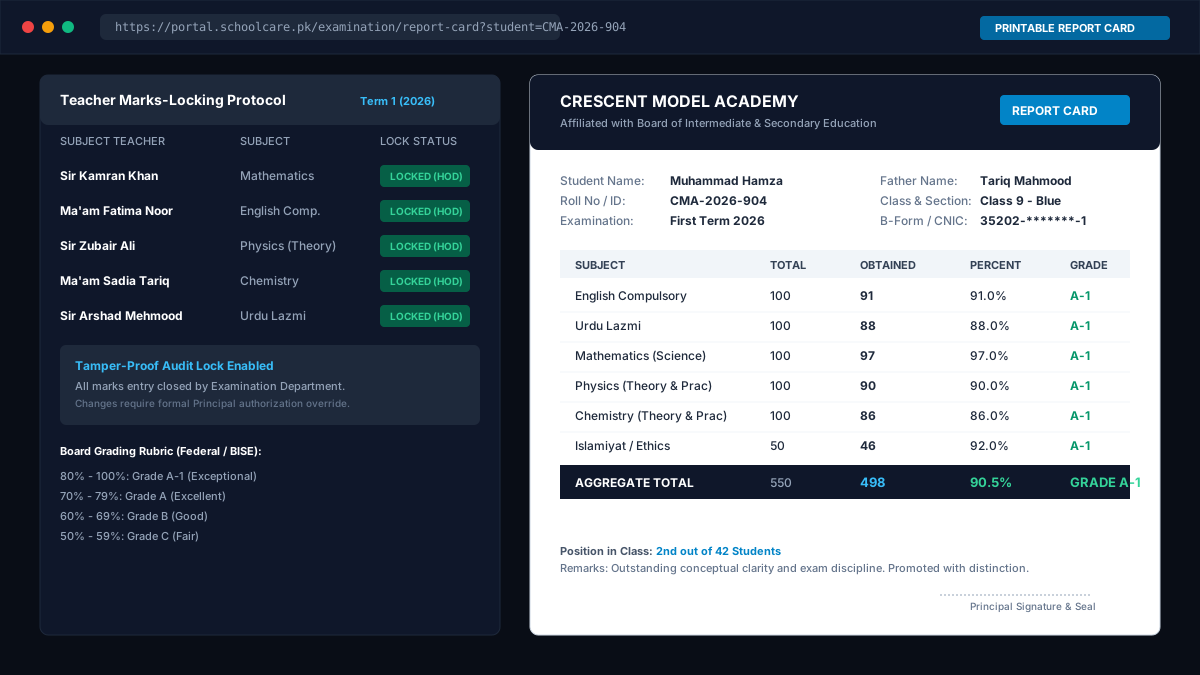
Subject teachers submit exam scores through restricted, role-gated teacher portals. Once marks are submitted and approved, registers are frozen to prevent tampering or unauthorized score alterations.
- ✓ Separate theory, practical, and viva marks recording
- ✓ Automated validation preventing entry above maximum subject marks
- ✓ Unfreeze authorization audit log for Examination Controller
Automated Grade Computations & Position Rankings
Stop calculating class positions by hand. SchoolCare computes total scores, percentages, letter grades, GPAs, and class position rankings instantly, handling ties gracefully.
- ✓ Section-wise and campus-wide class rank computation
- ✓ Failure rate alerts and subject average comparisons
- ✓ Board-compliant grading formulas (Matric, Federal, Cambridge)
Printable School-Branded Result Cards
Deliver professional, error-free term progress reports to parents on result day. Format cards with school crest, student photo, attendance statistics, teacher remarks, and guardian signature slips.
- ✓ Single or multi-term progress comparison views
- ✓ Batch PDF generation and bulk high-speed printing
- ✓ Digital publishing to Parent Portal with instant access
Complete Multi-Year Student Academic Archives
When a former student or educational board requests historical verification 5 years later, retrieve authentic term mark sheets and transcripts instantly. Zero lost paper registers or corrupted Excel files.
Frequently Asked Questions About Examination Management
Answers regarding grading schemes, teacher marks entry, and printable report card generation.
Can SchoolCare support custom grading systems (Percentage, Letter Grades, GPA)?
Yes. You can configure custom grading rubrics per academic wing (Primary, Middle, Matric, O-Levels). The system supports percentage brackets, standard Pakistani Letter Grades (A+, A, B, C, D, E, F), GPA computation, and custom passing mark criteria per subject.
How does the teacher marks-locking feature work?
Subject teachers log into restricted assessment portals to submit exam marks for their assigned classes. Once marks are entered and finalized by the submission deadline, the Examination Controller locks the subject register. Teachers cannot edit or tamper with submitted marks without formal administrative unfreeze permission.
Can we print school-branded report cards with our school logo and colors?
Yes. SchoolCare generates ready-to-print report cards formatted with your institution's official logo, campus address, student photo, subject-wise marks breakdown (Theory, Practical, Viva), class position ranking, total attendance, teacher remarks, and principal signature lines.
Does the system maintain historical student report cards across multiple years?
Yes. Student academic records are preserved in an immutable digital ledger. When a student progresses from Nursery through 10th Grade or O-Levels, their previous term report cards and exam transcripts remain accessible for transcripts and verification audits.
Can parents view examination report cards on their mobile phones?
Yes. Once the Examination Controller publishes term results, parents can view subject scores, term grades, and download the official report card PDF directly through the Parent Portal.
Have specific grading rules or board report card layouts for your school?
Book an Academic Consultation